Tuesday, 3 January 2017

Instructions in Java Programming Language

Every programming language is designed to process some kind of data , the data can be:

Number,Character and strings.

So after processing this data the program will give some information as result.


The processing of data is a sequence of some instructions, so every program will be consist of sequence of instructions, keep in mind that the every programming language have a syntax of write the instructions, like to write English we have to follow the grammar syntax.


The instructions written in Java will have following things:
  • Constants
  • Variables
  • Control statements
We will write the overview of these in this post and will discuss in details in the coming up posts.

Constants:It is a fix value that do not change during the execution of java program.Java programming language have different types of constants:

Integer constants:It is a sequence of digits, there are three types of integers:

                                               decimal , octal and hexadecimal
                                                 Eg:   123                -549           0              


Real Constants: It a sequence of digits that contains fractional part as well.These are used to                                            represent the fractional values like prices, heights etc.
                                           Eg:                125.25              .95
                                           These can be represented in exponential notation as well. Here is one example let say you want to write the number 221.65 into exponential notation then it will be written as 2.2165e2 , so e2 means multiply the number by 102.
The notation is known as:
mantissa e   exponent

The exponent part can have + or - sign, please be informed the exponent part cause the decimal point to "float". So this notation is said to represent a real number into floating point form.
Here we will give couple of examples:

The number 4200000000 will be written as 4.2E9 or 42E8
The number -0.000000365 will be written as -3.65E-7

Single Character Constant:A single character constant contains only one character enclosed in single character quote pair. Here are some examples of it:

Eg:          'x'        'f'               '5'            '8'

please be informed now the character '8' is not a number 8 it is a character constant not a integer constant.

String Constants: It contains a sequence of characters which are also enclosed in double quotes(not a single quote).

Eg:

"Hello Java Program"           "1995"        "This is good"      "7+8+7"


Variables: you can think like it is a memory container that will store a value during java program execution and this  container will store a certain type of data value only, and we called it data type.
 in Java there are three categories of variables:Local, Instance and Static.

Variable example:


Wednesday, 13 August 2014

Java Program to Calculate the Square Root of a nmuber

As in our previous program we have just printed the message using System.out.println() method now we are going to use more features of Java .We will use some packages(like header files of C++).It would be coming in your mind that what is package. Actually package is a set of java code that is already written by Java developers and we are going to use them in our program(we will see packages in details in upcoming blog post).
import java.lang.Math;           //import package statement
class SquareRoot
{
   public static void main(String arg[])
   {
       double num=5;                //declaration and initialization of variable
       double sqResult;
       sqResult=Math.sqrt(num);     //This statement will calculate the Square-root 
       System.out.println("Square root of num 5 is="+sqResult);
   }
}
In this program the structure is same as in the previous post program.But the new code that is there in the example is as following:-

  • variable declaration statement

double num=5;
this statement is a variable declaration statement that has variable name
num
,this name is used in further code as a reference of value 5.we will see full explanation that shows how to declare variables and what rules are followed in the upcoming post.
double sqResult;
This statement also a variable declaration statement but we are not providing the initial(default) value.

  • Method call of a class

sqResult=Math.sqrt(num); 
In this statement we are saving the result value to the variable sqResult. On the right hand side of equal operator(=) we are calling a method(function) of class 'Math' that accept the variable 'num' as argument and do some calculation for us(the code is already written in package) and return the result back . = equal operator set the result into variable 'sqResult'.

  • Printing the result on the command line
  • System.out.println("Square root of num 5 is="+sqResult); 
    This statement will print the message that is written in the double quotes and the value of the variable 'sqResult'.You can see that the 'println' is also a method(function' that is accepting the message given by us and it will do some work for us to print it on the command prompt.
Execution:-

  • Open notepad and write the code:-


  • Save the code in file with name' SquareRoot.java':-

  • Compile and Run the program in command prompt:-


Monday, 24 March 2014

Implementing your first Java program


Implementation of java program involve the following steps:-

  • Creating the program
  • Compiling the program
  • Run the program
  • Creating the program:-To create the java program your can use text editor(like Notepad in windows).Open your text editor which you are going to use and type the following code in that:-
  • class MN
    {
     public static void main(String arg[])
     {
      System.out.println("Hello and Welcome to java programming");
     }
    }

    Save the file with MN.java (MN should be the name of file as the class name is name is MN)Name as in this screen short
    • Explanation:- 
      • Class Declaration:-The first line
        class MN
        
        This line declares a class .It is the first step to object-oriented programming.We know that Java is Object Oriented Programming ,so everything is is inside the class (class Name is MN here ).The keyword class is used to declare a class.

      • Opening Brace:-the braces { } are used to group the class definition.
        class MN
        {
        
        }
        
      • Main line-The line
        public static void main(String args[])
        
        In this line main is a method ,like we have in C and C++ main().In every Java application there must be main()method .Because it is the starting point of program execution by the interpreter.A Java program have only one main() method.With main() method there are other keywords are used explanation of them are as following:-
        public The keyword public is a access specifier that declares the main method accessible to outer classes this is because the Java program execution is started by the Operating System so main method is accessible to the Operating system.
        static The keyword static declares the main() method as one that belog to the entire class not a part of the object of the class,main method is declared as static so that Java interpreter can use the main method before any object is created of that (here MN) class in which the main is written.
        void The type modifier void states that the main() method will not return any value to the Operating system
        String args[] This is a parameter that is passed to the main() method ,at this movement just remember that it will hold the values that we will pass to the program when we will run the program
      • Output Line-The line
        System.out.println("Hello and Welcome to java programming");
        
        This is Similer to the printf() statement in C and C<< in C++.Similarly in Java System.out.println() is available.Because Java is truly Object Oriented Programming Language. So in this statement System is a class ,out is static member of System class and println() is a method of member out.

Saturday, 15 March 2014

Introduction to Java


Java is a general purpose object oriented programming language.We can develop two types of Java programs that are:-

  • Standalone applications
  • Web applets

  • Standalone applications:-Standalone applications are programs written in Java to carry out certain tasks on a standalone local Desktop Computer.The programs can be develop to do task on a local computer (like Calculator you use in your Operating System,Notepad can be developed in Java,Yahoo Facebook messenger etc).These Standalone application can do communication with the Internet also to do needful tasks. A good Example of Java standalone application is ThinkFree that is written in Java.It is just one example there are so many applications that are written in java and the advantage that these applications get is platform independent,means these are written once and can be run on any operating system that may be Windows,MAC,Linux etc.So the programs that we will develop in upcoming posts will be developed only once and without any change you will be able to run them on any operating system with any hardware lying below operating system.Developing a Java application involve following steps:-
    • Write The source-code in a file and store that with .java extension.
    • Compile the source-code file into byte code using javac compiler.(steps to install the JDK that has java compiler)
    • Execute the bytecode program using java Interpreter.

  • Web applets:-Java applets are small Java programs developed for internet applications .You may play online games that are mostly Java applets that run in your browser (downloaded through internet),you may notice some websites that have animations running and you interact with that animations that are all java applet programs that are written in Java.So we will see how to develop them in upcoming post.

Note:-These above types of programs types are developed using just J2SE that is Java 2 Standard Edition.Java has a wide range of other tools that are J2EE that are used to develop Enterprise applications.J2ME for mobile application development.

Tuesday, 11 March 2014

How to install and configure java(JDK) environment to develop programs?


Before going to start installation of java(JDK) ,I will suggest you that please check your system configuration and match that ,would your system is fulfilling the minimum requirements required to run java.I am pasting the link of ORACLE website were the minimum and maximum requirements are  available,I am not writing them here because these requirements change time to time.So here is the link:-


Installation Guide and System requirements on Oracle website:-
http://docs.oracle.com/javase/7/docs/webnotes/install/

Windows Requirements:-
http://docs.oracle.com/javase/7/docs/webnotes/install/windows/windows-system-requirements.html


So if your system fulfill the  hardware and software requirements then you can go to following steps of installation:-


  1. Download the java(JDK) form the Oracle website as per your Operating system,link of Oracle website for JDK is :-http://www.oracle.com/technetwork/java/javase/downloads/jdk7-downloads-1880260.html    .This link when pasted the JDK7 was latest one development kit.
  2. Here I am using Windows 64 bit OS machine so I am downloading the Windows x64.After downloading the JDK you will get one file with extension .EXE(because I am using Windows OS,you have to download as per your OS),so double click on this setup file:-

Thursday, 6 March 2014

What is JDK?

JDK is a Java Development Kit ,that is a collection of tools that are used for developing and running Java Programs. JDK include the following:-

  • javac(java compiler)
  • appletviewer (used to view the applet programs)
  • javap(java disassembler)
  • javadoc(java HTML document creator)
  • javah(for C header file uses)
  • java(java interpreter)
  • jdb(java debugger)
Brief Description about the tools:-
  • javac:- java compiler is used to compile the java source code to bytecode(.class files are generated).It translate the java source code that is written by the programmer ,to bytecode that become input for the java interpreter. Syntax:-
                          javac <SourceFileName>.java
  • appletviewer:-It is used to run the applet programs and see the output of the applets ,it help to test that ,is the applet is running as per the internal coding or not.you do not need any browser to run the applet you can use the appletviewer tools to run applet.
                appletviewer <SourceFileName>.html
  • javap:-Java disassembler enables the programmer to convert the byte code files into a program description like package, protected, and public fields and methods of the classes
  • javadoc:-It create HTML formatted documentation form the java source code files.The developers use the comments ,doc tags and annotations in the programs which are the converted to HTML document for reference in future .
  • javah:-javah produces C header files and C source files from the java class files ,so that native method implementation can be done.
  • java:-java interpreter tools is used to  generate the machine code from the .class file,the end code generated by the java tool will be understandable by the machine hardware and output will be displayed to the user.
JDK tools used in java application development

Java Features


The main reason to develop a new language called Java ,was to offer solutions to those problems which are not possible to solve using existing languages(like using C ,C++),some of these problems were portability,reliability,distributional,compact etc.So there are some features of Java that make it popular in the market of general purpose stand-alone application development:-

  • Compiled and Interpreted Language:-We can search any language ,and it can be seen that a language it either compiled or interpreted.But Java is the combination of both,that is why Java is platform independent .Java code is first compiled (using compiler)and source code  is translated to byte code instructions .These byte code instructions are not machine independent,so they are interpreted (using interpreter) to machine code, that is directly executed by the machine ,on which java program is running.So java is both compiled and interpreted language.
  • Object Oriented Language:-Java is truly object oriented language ,in this everything is an Object ,everything is written the objects and classes(even main method is written in class that is not possible in C++ like language).Java has a extensive set of classes ,that are arranged in different packages.We can import (like we include in C++)them in our program and can use their functionality.
  • Platform Independent and Portable Language:-One of the reason Java is popular today is its feature of portability ,means Java programs can be moved from one computer to another computer any ware and any time , without any change in source code . Changes and up-gradations in the Operating Systems,in processors,in any other resources will not force any changes in the Java programs.That is why it is the first choice for software development.You may see the Applet programs running on your web browser when you open any website(advertisement or some popup) ,that are written in Java programming language ,and they are written only once ,when any person open the website that Applet programming run on the person's computer,what ever processor,operating systems he\she has.So java is platform independent and portable language.
  • Simple and Familiar Language :-Java code syntax has similarity with other languages like C ,C++.So the C++ developers can easy learn Java programming language and can start developing java programs.But there are some features which of C++ which are not supported by Java ,that are:-
    •  Pointer are not supported by Java.
    • Pre-processor  header files are not supported by Java.
    • goto statement is not supported by Java.
    • Operator overloading is  not supported by Java.multiple inheritance is not supported by java etc 
          So if your are a C++ developer and going to start with Java then you should keep in mind the                      difference in features and other thing which are not common in C++ and Java.

  • Robust and Secure Language:-Java is a robust language .It provide so many protection in code generation and execution to ensure the reliability.It has strict compile and run time checking of data types.Java has internal garbage collection mechanism that relieve the programmer from all memory management problems.Java has implementation to check all the exceptions and errors that may be risky while execution and it show all the errors and exception warning before execution.
               When it comes the point of secure language ,then it is clear cut answer is that Java does not have           pointer so the viruses and threats can not get access to the memory locations where data reside ,so              Java is a secure language.
  • Multitheaded Supported Language:-Java language support multithreaded  programming ,means you can create different threads for different tasks in your Java applications which will give better experience to end your in terms of faster results ,so your application will have better productivity ,if your will use Java mulithredded programming.But keep in mind that you should have complete knowledge about how to use multithreading  in your application.
  • Native method support:-Java support native methods means your can use the C++ written functions in Java programs ,this helps the programmers to use the already written code in the application development.
  • Ease of Development:-Java  has many features like Generics,Auto-boxing,Un-boxing,Annotations, Static import of packages etc ,these features reduce the overhead of the programmers and make the development easy.These also reduce the time of coding and application development can be go in next phase like testing phase .
  • Monitoring and Manageability APIs:-Java has a large no. of APIs one of them in JVM Monitoring and Management APIs  like JMX to monitor and manage Java applications.There are other tools like jconsole, jps,  jstats etc,these tools facilitate the management and monitoring tasks.

Thursday, 27 February 2014

Java History and future releases


Java is general purpose object oriented programming language,which .is developed by Sun Microsystems in 1991.Java was originally called Oak by James Gosling ,one of the inventors of the language,Java was actually designed for the software development of consumers electronic devices like TVs,, VCRs,etc.The goal has a impact on the development project to make the language simple portable and highly reliable.The project team discovered that the languages in the market like C ,C++  had limitations in terms of reliability and portability. So the project team pick up those  features of C and C++ which are good and leave those features which are causing security and other problems.So a new programming language was developed and released in the market.


Here is some Java Milestones :-
Java History
1990 Sun Microsystems decided to develop software that could be used to manipulate consumer electronic devices.A team headed by James Gosling  was formed to undertake this task.
 1991   After exploring the programming languages which were popular in the market like C ,C++ the team announced a new language named as "Oak".
 1992  The team (named as Green Project team by Sun Microsystems) demonstrated the application of there new language to control the home appliances using a hand held device. 
 1993  The world wide web appear on the internet that transformed the text based interaction into a graphical environment.The team come up with the idea of development of small tiny programs(applets) using new language which they have developed("Oak").These new programs can run on any type of computer connected to the internet. 
 1994  The team developed a new web browser called "HotJava" to run applet programs on internet. 
 1995  The language "Oak" was renamed as "Java" due to legal issues
 1996  Java established itself as a leader for Internet programming as well as general purpose  ,object oriented programming language .In this year the Java Development Kit 1.0 was released.
 1997  Sun has released Java Development Kit 1.1(JDK 1.1).
1998 Sun releases Java 2 with version 1.2 (SDK 1.2).
1999 Sun releases Java 2 Platform (J2SE) and (J2EE).
2000 J2SE with SDK 1.3 was released by Sun .
2002 J2SE with SDK 1.4 was released.
2004 J2SE with SDK 5.0 (instead of JDK 1.5 ) was released.
2006 J2SE with SDK 6.0 was released.
2011 J2SE with SDK 7.0 was released.
2014 J2SE with SDK 8.0 will be released.
2016 J2SE with SDK 9.0 will released.


Tuesday, 7 January 2014

Why is Java Strongly associated with the Internet?

Java  is strongly associated with the Internet because the first application program written in Java was HotJava,a browser to run the applet on Internet .So the Internet users use the Java to create the applet programs and run them locally using a 'Java-enabled browsers' like HotJava..The users can use the 'Java-enabled browsers to download the applet located on the computer system anywhere in the internet ans run it on their computer.

Downloading a applet via internet


So the Internet users  start setting up the their web sites  containing Java applets that could be used by the other remote internet users .So this ability make the Java programming language popular among the Internet programmers ,so the Java is popularly known as 'Internet Language'.


Wednesday, 25 December 2013

List a few major difference between C++ and Java

There are following some difference between C++ and Java:-

What is multithreading ?How does it improve the performance of the Java?

Multithreading means handing multiple tasks simultaneously,like listing to an audio song while downloading a file from a distent computer.Java support multithreading.Java programs can be written to support multithreading. In Java two programes can be run to do different tasks,like to show the GUI graphics to the user and simultaneously read a file from the hard-disk.So it make the application run smoothly,so that the performance will be better.

How java is more secure than other languages?


Java is more secure because of following reasons:-
  • No use of pointer :-
  •             Java do not use the pointers like other languages c,c++.(pointers are variables which holds the memory addresses).These pointers leads to unauthorized access to the memory blocks if some other program get the pointer values,and can change and manipulate the data stored in the systems RAM.But java does not use the pointers,it has its internal mechanism to manage the memory management .Java give the access to the data to the programs which has proper verified authorization.
  • Concept of error handling and exception handling :-
  •           Java provide the exception handling concept which capture series errors and eliminates any risk of crashing the system.Java compiler check all the code lines and check that if there is any line of code that may create error and give warnings to the programmer like "deprecated methods and classes",so that the more effective program can be written by doing changes in the program .It checks the at the time of execution and may create the exception ArrayIndexOutOfBoundExceptionso that these exceptions can be handled without program crash ,and unauthorised memory contents are not accessible and modifiable by any other programs.
  • Strict Data Type Checking:-Java compiler strictly check the data type that is defined to the variables in the program ,so that there unboxing and unboxing operations can not lead to security issues.Java provide wrapper classes to use in place of primitive data types like Integer class to use instead of int data type ,there are many more.
  • Garbage Collector:-Java has its internal garbage collector that automatically deallocate the variables and objects that go out of scope ,so that the and security issue may lead ,and it also effective to put the memory management task in the hand of Garbage Collector ,because the programmer may do mistake in programming logic(like left destruction of objects and pointers)  that may lead to loophole in the security of program.But java is secure in this case.

Friday, 6 December 2013

Why is Java known as platform-neutral language?

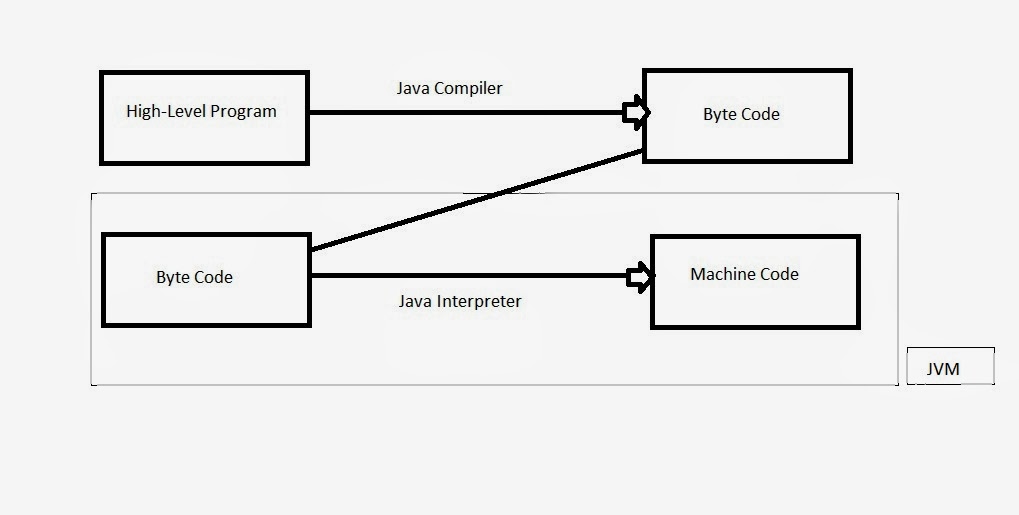
Java is known as platform independent because it uses the concept of  generating the byte code of the high level program ,and then run that byte code(intermediate code) on JVM(Java Virtual Machine),now what is JVM,actual JVM is a virtual computer system that run on your original computer system .
   JVM converts the byte code to machine code according to the your original computer's machine architecture(your computer system architecture like x86,ARM etc.).Here is flow how the Java handle your high level program.


      So java compilation is done only once ,after that the byte code can be interpreted on any machine that have JVM.JVM is of different type according to computer system architecture,means for x86 JVM will be different for ARM JVM will be different etc.These are developed by the java vender that is Oracle.This JVM come as a part of JDK(Java Development Kit).
So this compiler and interpreter has make it platform-neutral language.  

Friday, 6 September 2013

List of a few areas of application of OOP technology


  • Now a days OOP is most popular technology among programmers.It is used in the area of designing of user interface windows of every software .


Like:-


In above the design of textbox labels buttons etc are developed using Object Oriented Programming ,because it easy to co relate there working in the manner of Objects. So today all the software development is done in OOP .


  • Real time systems are much complex and contain many more objectives with complicated attributes and methods. So in real time systems OOP is useful because it can simplify a complex problem.We can create complex objects in OOP and can create there communication methods and can get the results .In the coming post we will create Real time objects and see there working  also.

  • Simulation and modelling applications can be created using OOP because in OOP we can handle real time objects and can generate there behavior  in simulation system also.

  • Object Oriented databases are good application of OOP ,in object oriented databases we can handle objects easily,object data can be processed easily.

  •  There are other applications of OOP are:-
  • AI and expert systems 
  • Neural network 
  • Parallel programming
  • Decision Support Systems
  • CIM
  • CAD etc.

Friday, 30 August 2013

What kind of things can become objects in OOP?

When we start programming in OOP(Object Oriented Programming) the things which have some attributes and have some functions will become objects.Here is a example to check that what will become a object:-

Example :-

       Let say you are going to develop a software for the School to take attendance on computers ,so you will start programming in object oriented .You will analyse that in attendance what are the things which have attributes and some functionality.These things will come in your mind like Student,Teacher,Register etc.
    You will analyse that when attendance is taken the teacher take the attendance ,student speak that I am present and register is used to mark the attendance.


So the Program will have following things:-


class Student
{
     string  sName ;
     int      sRollNo;

}
class Teacher
{
      string TeacherName;
}

class Register
{
        Student   StudentList[20];
}


Tuesday, 16 July 2013

Distinguish between Data Abstraction and Data Encapsulation?

Data Abstraction:-Data abstraction means get the desired things.In data abstraction we use the features which we want ,without worry about the implementation.We have not the information how it will be done?Lets have an of real world example
You usually use mobile phone,when you do a call to your friend.Which steps you take (1)Type the number(2)Press the call button.


But you do not know what happens after that how the mobile implement this task to connect you with your friend..So the mobile has only abstract operation only which are type the number and press the call button.

Same as this example we have function of a object in programming, which done the particular task, these functions will do the task in there internal code only without showing it publicly.

Dummy code example:-
You might listen about the Stack which work on the principle to LIFO(Last In First Out).Stack have two operation PUSH and POP.So this function will do the data abstraction means these will do the internal work without telling the internal implementation.User will just use these two functions to do the task.
class Stack
{
       int numbers[]=new number[10];
       int top;
      Stack()
      {
         top=-1;
       }
      public void PUSH(int num)
      {
        ------------------
       }
       int void POP()
       {
        ------------------
        }

     public static void main(String ar[])
     {
             Stack marks=new Stack();
              marks.PUSH(10);
              marks.PUSH(20);
              int get=marks.POP();
           
}
\Note:-this Example is given to understand the concept only it will not be complied by the compiler.Please do not worry we will do this in proper format when you will have the knowledge about syntax etc in coming posts.


Data Encapsulation:-Data Encapsulation means wrapping the data and methods in a single unit.In programming class do the Encapsulation.Like capsule wrap up the medicine in it.

Example:-

class Chair
{
             int height;
             String color;
              Char()
              {
                 
                }
                public void setColor(String col)
                {
                           color=col;
                }
                ------
                ----------
}

So the Chair class is wrapping up the data members and methods in it


Thursday, 4 July 2013

Distinguish between Object and class?


Object:-Object is a entity which remain active in the system(Like we are a object which remain active in the world).The Object can represent a person,a place,a bank account etc which is handle by the program.So in programming every problem is analysed in terms of objects and there nature of communication(Like in world we communicate with others ).So when a program is executed these objects  reaming active in system and interact  by sending messages to each other.Remember that these objects do not know the internal details of each others.Lets take an example how objects communicate:-

Objects Communication

When you go to Bank you have to communicate with some one to get information same as objects communicate with each other to exchange information,like in above example the program(software)developed to manage bank account data,that program will have two objects one will be Customer and other will be Account(remember that at the project level there will be so many objects will be created) and they will communicate to do bank transaction.

Class:-We know every objects have data and methods code  to manipulate the data.(like we have some attributes and functionality).The entire set of data and methods code of an object can be made user defined data type using the class.Once a class is defined we can create any number of objects belonging to that class.Example:-

Class Student
{
      String  Name ;
      int age;
      Student(String nm,int ag)
      {
          Name=nm;
          age=ag;
      }
      public static void main(String arg[])
      {
          Student Steve=new Student("Stave",21);
          Student John=new Student("John",19);
}

So in above example student is a class,Stave and John are objects of Student class

Tuesday, 2 July 2013

What are the advantages of Object Oriented Programming Approach?

There are Following Advantages of Object Oriented Programming:-

  • Using Inheritance we can remove the redundant code and can extends the existing classes.
  • We can develop the programs in standalone modules that communicate with each other to do specific task,so we can start the development from already available code and we do not required to start from scratch.(we will see later how to use the already available code in class packages)
  • Using the principle of data hiding helps the programmers to develop secure programs that cannot hacked.
  • We can add the new features(modules) in a software code ,without effecting the previously working modules.
  • We can match the objects and their working easily.
  • It is easy to understand the working of complex objects in object oriented programming.

Wednesday, 26 June 2013

How are data and methods organized in an object oriented program?


When we talk about object oriented programming we say data and methods but why so?

  •  The answer is that an object has some properties and that properties represent the data.Like
  Example:- Student object has some properties like name,age,roll_no etc so that is data about the  object.
  Lets see with program ,at this time do not bother about the code(if you are beginner):-
   class Student
   {
         String name;
         int age;
         int roll_no;
    }
         So you can see that a student can have name,age,roll_no etc. So this is data about the student.


  • Now second come methods(functions),the methods are the operations which are performed on the data of the object.


Monday, 24 June 2013

What is object oriented programming?


Object oriented programming is  a programming paradigm that represents the concepts as "objects" that has some fields(called attributes) and methods associated procedures called "methods".Objects that are running instances of class ,usually interact with each other ,throughout the application running ,to achieve the desired results. 
I am going to give a example:-
Let say you want to develop a software for the school Management .So how you will start the development?
The answer here will come is that you will look at the problem in real life.

The solution will start by looking at the real life objects and there interaction in the school system.Means you will look at that the objects in the school are:-

Teacher,Student,Accountant,Securityman,Principal,etc.

So you have seen these are the objects which will also remain active in our software.and the software will work as they will interact with each other as they do in real life.